
The important message gets through — via the channel that worked
An order confirmation, a sign-in code or a delivery status cannot be sent “somehow”. Transactional messages use a separate queue, and a cascade tries channels in turn and does not spend money on SMS if the customer has already read the message in a messenger.
Order notifications and cascades
- Notifications are scattered across the site code, the CRM and different gateways
- SMS goes to everyone, although half of your customers read messengers
- It is unclear whether the message arrived and through which channel
- 01
Send with one call
POST /messages from your server: a template, a recipient and order data. The recipient profile is created or updated automatically, and the message goes out at once through a separate queue.
- 02
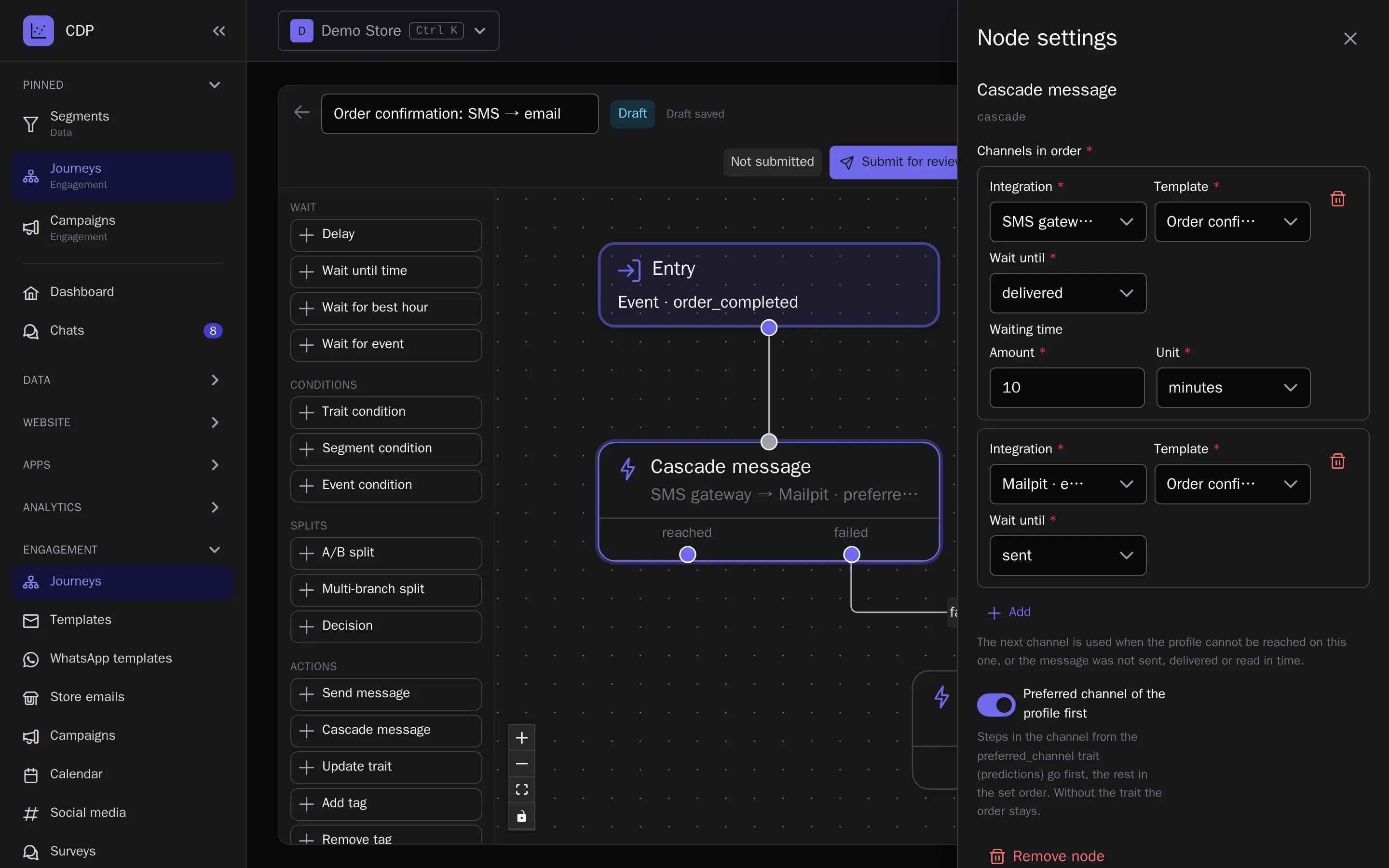
Define a cascade
For example, WhatsApp, then SMS if not delivered within 2 minutes, then email. For each step you choose what to wait for — sent, delivered or read — and for how long.
- 03
Use it in journeys too
The same cascade is a journey node: a cart reminder or a reorder prompt goes through the cheapest channel that gets through.
- 04
Track the status
The status of every message and cascade is available via the API, and deliveries, reads and errors land in the customer profile and the channel report.
- All notifications in one place with shared templates and statuses
- The expensive channel is used only when the cheap one did not work
- For every customer you can see which message they got and where
Built on
- Abandoned carts and repeat purchasesThe first automated scenarios for a store: carts, welcome, the purchase after the purchase.
- Personalization: recommendations and searchPersonal picks on the site and in emails, and catalog search that forgives typos.
- Win back customers who are leavingChurn prediction, RFM segments and reactivation journeys before the customer is gone.
- Loyalty programPoints, paying with points, tiers, refer-a-friend and promo codes — on the same profiles.
- Moving from another platformCustomers, events, consents and segments from Mindbox, Customer.io and Retail Rocket.
- Revenue and marketing attributionRevenue, LTV, traffic sources and sales attribution by channel — on the same events.
- Marketing with a small team and AIClaude or ChatGPT answer from reports and build segments, emails and journeys over MCP.
- Large databases and strict requirementsFrom 250,000 profiles: a dedicated IP, an SLA by contract, long retention and access control.
- Agencies and integratorsThe platform under your brand: your domain, client projects and your journey templates.
Try it on your own data
14 days on the Growth plan, no card required: up to 1,000 profiles and 500 emails a day.